How to Quickly Assess Website Backlink Quality? Using Keywords Everywhere Moz Metrics
Learn how to use Keywords Everywhere to view Moz Domain Authority, backlinks, referring domains, and spam scores directly on Google SERPs for more efficient SEO analysis.
How to Quickly Assess Website Backlink Quality? Using Keywords Everywhere Moz Metrics
If you do SEO, you’ve probably been in this situation: you want to quickly check a competitor’s backlink profile, but you have to open Ahrefs, Moz, or Semrush, type in the URL, wait for it to load, and then sift through the data one by one. Before you know it, several minutes have passed.
What if you could see the Domain Authority and backlink count for every search result right on Google? Keywords Everywhere recently rolled out an incredibly useful new feature — Moz link metrics displayed directly on Google search result pages. Let me share my experience with this feature.
View Moz Data Directly on Google SERPs
Once you have the Keywords Everywhere browser extension installed, every time you search on Google, you’ll see a row of new data metrics at the bottom of each search result.
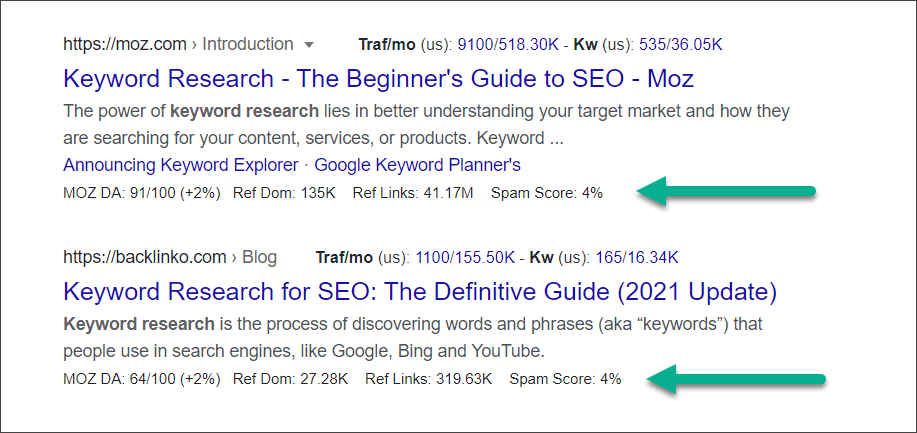
These four metrics are:
-
DA (Domain Authority): The Moz Domain Authority score, which measures the overall authority of a website on a scale of 1-100. The percentage next to it shows the DA trend over the past 12 months — this is incredibly useful for spotting websites whose backlinks have surged or plummeted recently.
-
Ref Dom (Referring Domains): The total number of unique domains that have linked to this website. Note that this counts “domains” not “links” — 100 links from the same domain only count as 1 referring domain.
-
Ref Links (Backlinks): The total number of backlinks pointing to this website.
-
Spam Score: The Moz Spam Score, which measures the risk of a website being penalized by search engines. Lower is better — anything above 30% should raise a red flag.
Having this data displayed directly on the search results page means you can quickly assess a website’s backlink quality without ever leaving Google.
DA Trend Chart: See a Website’s Growth Trajectory at a Glance
Looking at the current DA value alone isn’t enough — we want to understand a website’s development trend. Hover your mouse over these metrics, and a detailed panel will pop up with a DA trend chart.
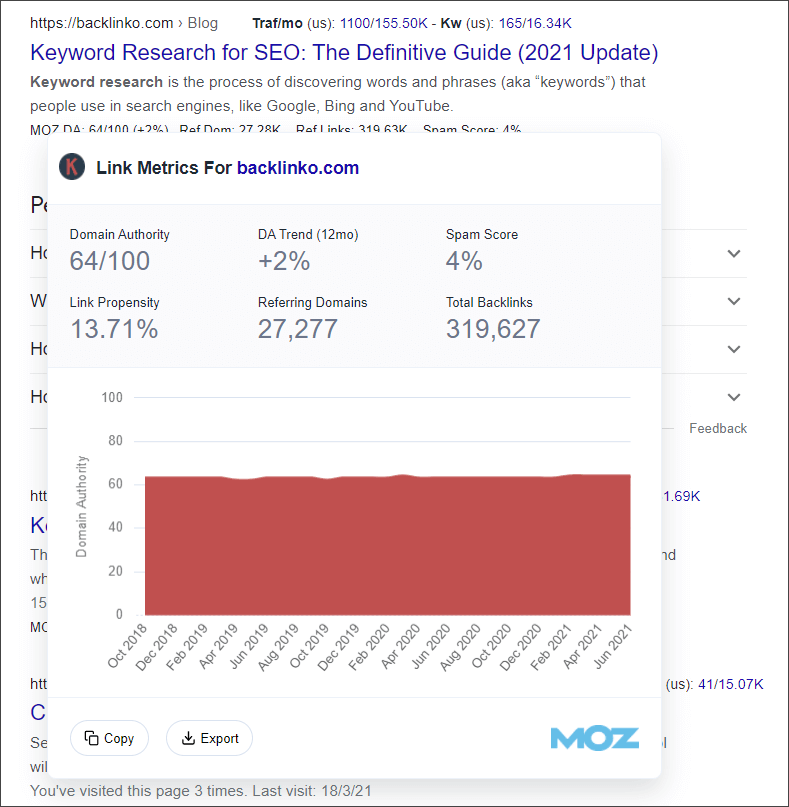
This chart displays the DA trend for the website over the past 3-4 years. With it, you can:
- Spot fast-growing websites: A rapid DA increase over a short period indicates strong backlink building efforts.
- Identify penalized websites: A sudden cliff-like drop in DA may signal an algorithm update or a penalty.
- Assess website stability: A consistently stable DA is more trustworthy than one that fluctuates wildly.
For competitive analysis and backlink opportunity discovery, this trend chart provides significant reference value.
Backlink Details: Up to 10,000 Links
Beyond the overview data, Keywords Everywhere also provides an in-depth backlink lookup feature. Next to each search result, you’ll see a “Show Backlinks” link.
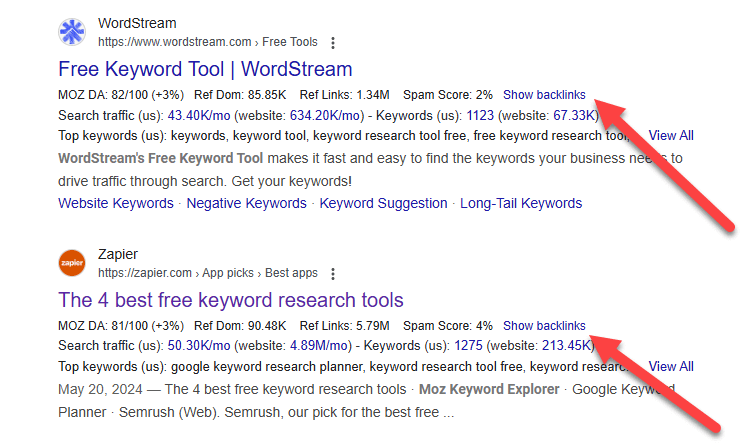
Clicking it opens a panel showing detailed data for up to 10,000 backlinks for that URL:
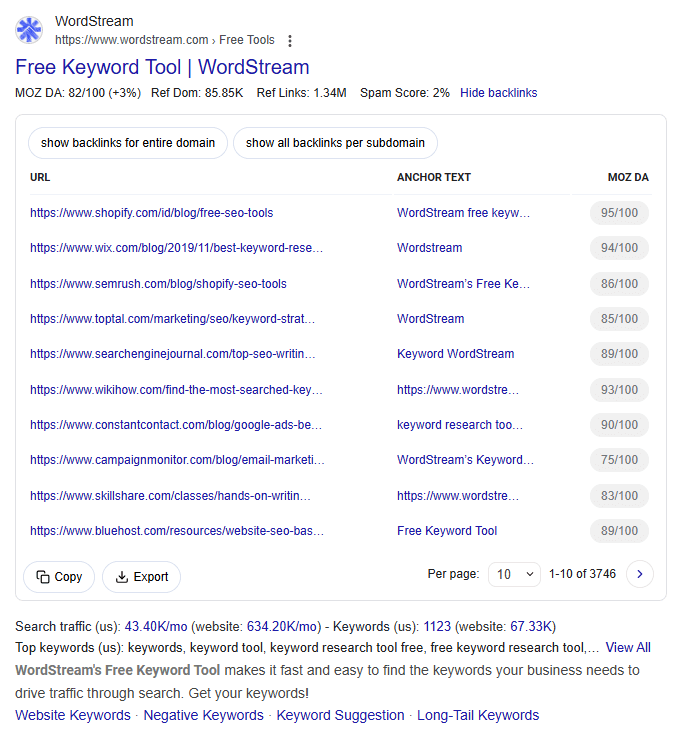
Each backlink record includes:
- Source URL: The page that links to the website
- Anchor Text: The keyword used in the backlink
- Source Domain Authority: The DA of the linking website
Three Viewing Modes
The tool offers three flexible viewing options:
- Default mode: Shows only one backlink per source domain (to reduce data redundancy)
- Show all backlinks per subdomain: View all backlinks from the same subdomain
- Show backlinks for entire domain: View backlinks pointing to all pages on the website
This feature is particularly useful for analyzing a competitor’s backlink structure — you can see which websites link to them, what anchor text they use, and which backlinks are of the highest quality.
Practical Applications: How to Use These Metrics
With this data at your fingertips, you can make many quick assessments in your SEO work:
Competitor Analysis
Search for core industry keywords and quickly scan the DA and backlink data for each result on the SERP. If the top 10 results all have DAs above 60 and your site is only at 30, competing for this keyword will be very difficult in the short term.
Backlink Opportunity Discovery
Use the “Show Backlinks” feature to analyze where your competitors get their backlinks. Look for websites with moderate DA and low Spam Scores — these are often your best targets for acquiring backlinks.
Website Quality Assessment
When doing backlink building or content collaboration, use this feature to quickly evaluate the quality of a partner’s website. Websites with very low DA or high Spam Scores may not be worth investing your resources in.
Monitor Your Own Brand
Regularly search for your brand name or core keywords and observe your own website’s DA trend changes. If you notice an abnormal decline, you can investigate the issue promptly.
Conclusion
The Moz link metrics feature added by Keywords Everywhere makes backlink analysis more convenient than ever. No more switching between multiple tools — you can get key backlink data right alongside your Google searches.
Personally, the DA trend chart and backlink details are the most practical features. The former helps me quickly judge a website’s growth trajectory, while the latter provides concrete direction for backlink building.
If you’re using Keywords Everywhere, give this new feature a try — it will significantly boost your SEO analysis efficiency.