Finally! Keywords Everywhere SEO Difficulty Metrics Explained
A deep dive into Keywords Everywhere's new SEO difficulty metrics, including off-page difficulty, on-page difficulty, and brand query detection to help you accurately assess keyword optimization value.
Finally! Keywords Everywhere SEO Difficulty Metrics Explained
If you do SEO, have you ever been confused like this: you find a keyword with good search volume and low competition, so you start optimizing heavily, but months later, your ranking hasn’t moved at all?
What went wrong? The “competition” metric provided by traditional SEO tools often fails to accurately reflect the true ranking difficulty.
For years, SEO practitioners have been confused about the relationship between keyword competition scores and actual SEO difficulty. The good news is that Keywords Everywhere has finally been updated with 4 key SEO difficulty metrics that can help us more accurately assess the optimization value of keywords.
4 New SEO Metrics
Every time you search on Google, Keywords Everywhere displays a widget with new metrics in the top right corner, as shown in the screenshot below.
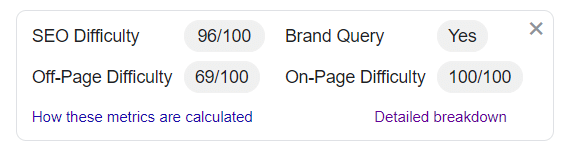
This widget displays four new data points:
-
SEO Difficulty: Measures how difficult it is to get a top ranking for this search query. Higher values mean more difficult to rank.
-
Brand Query: Tells you whether Google considers this search term to be brand-related. Unless you are the brand itself, brand queries are very difficult to rank first for.
-
Off-Page Difficulty: Measures the backlink authority of the top 10 pages for this search query. A higher value here means you need to gain more domain authority through backlinks from top websites to compete.
-
On-Page Difficulty: Measures the content optimization level of the top 10 pages for this search query. When most results are well-optimized, this value will be high; in this case, link metrics (or brand value) will be the deciding factor.
Why These Metrics Are Worth Your Attention
Transparency is the biggest difference between Keywords Everywhere and other SEO tools.
Unlike tools that hide behind “secret algorithms,” Keywords Everything has made all calculation methods public. After clicking the “Detailed Breakdown” link, a new page opens explaining exactly how each metric is calculated.
This is very helpful for us to understand the tool and trust the data. Next, let’s look at the specific calculation methods for each metric.
Off-Page SEO Difficulty
Off-Page SEO Difficulty is a 100-point score that measures the link authority of the top 10 results on Google’s first page for a search term.
The tool fetches Moz Domain Authority and Open Page Rank scores, then calculates the off-page difficulty score for each result using the following formula:
Off-Page SEO Difficulty = 75% × (Moz DA) + 25% × (OPR × 10)Calculation Example
Assume a website has a Moz DA of 49 and an OPR of 4.33, the calculation process is:
- (0.75 × 49) + (0.25 × 4.33 × 10)
- (0.75 × 49) + (0.25 × 43.3)
- (36.75) + (10.82)
- 47.57
The tool gives Moz DA 75% weight because it is one of the most trusted metrics in the SEO field today; OPR gets 25% weight to balance DA’s shortcomings in calculating specific domain authority.
Finally, add up all the off-page SEO difficulty scores for the top 10 results and take the average to get the off-page SEO difficulty for that search term.
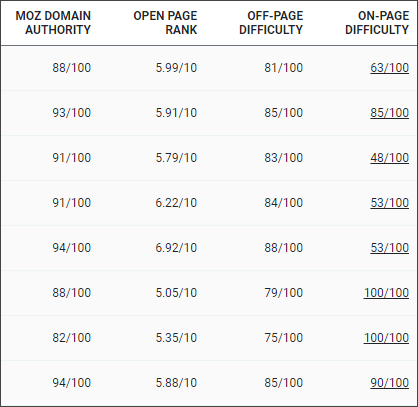
As shown above, after clicking the “Detailed Analysis” link, you can see the raw Moz DA and OPR data for each result, as well as the calculated off-page SEO difficulty score. This is very valuable for judging how many backlink resources are needed to compete.
On-Page SEO Difficulty
On-Page SEO Difficulty is also a 100-point score that measures the content optimization level of the top 10 results for a search term.
The tool uses the following 7 rules to calculate the score for each result:
| Page Title | URL | Description | |
|---|---|---|---|
| Exact search query (or its plural form) appears | 15 points | 5 points | 5 points |
| Broad search query (or its plural form) appears | 25 points | 10 points | 10 points |
| Google bolds keywords in description or special description | 30 points |
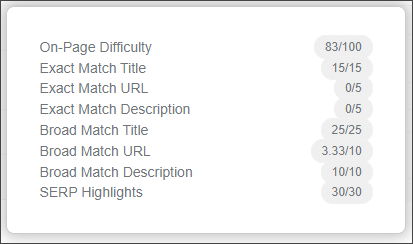
On the “Detailed Analysis” page, clicking the “On-Page Difficulty Value” for each page will pop up a window showing the specific scores for each of the 7 rules.
7 Scoring Rules Explained
Rule 1: Exact search query appears in page title (15 points)
If the exact search query appears completely in the page title, you get 15 points.
Example: Searching for “weight loss diet”, all three words must appear in the title in the same order to get 15 points.
Rule 2: Exact search query appears in URL (5 points)
If the exact search query appears completely in the URL, you get 5 points.
Example:
domain.com/weight-loss-diet-tips.html✅ Gets 5 pointsdomain.com/weight-loss-best-diet.html❌ No points (wrong order)
Rule 3: Exact search query appears in description (5 points)
If the exact search query appears completely in the page description, you get 5 points.
Rule 4: Broad search query appears in page title (25 points)
The tool checks whether each word in the search term exists in the page title. For each word found, points are allocated proportionally from 25 points.
Example: Search for “weight loss diet” (3 words)
- Only “weight” found → 25 × 1/3 = 8.33 points
- “weight” and “loss” found → 25 × 2/3 = 16.66 points
- All three words found → 25 points
Rule 5: Broad search query appears in URL (10 points)
Similar to Rule 4, checks whether each word in the search term exists in the URL, allocating 10 points proportionally.
Rule 6: Broad search query appears in description (10 points)
Similar to Rule 4, checks whether each word in the search term exists in the description, allocating 10 points proportionally.
Rule 7: Google bolds keywords in description or special description (30 points)
Sometimes Google displays special description formats for certain results, such as tables, lists, ratings, and other structured data. When the tool identifies a special description, it gives the page all 30 points.
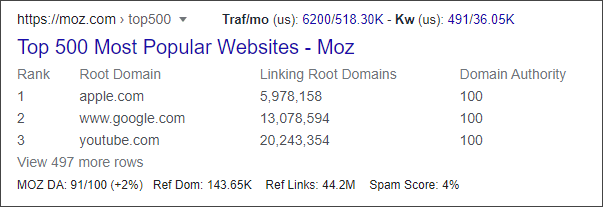
When the description is regular text, Google usually bolds certain words. These words could be the search terms themselves, or synonyms, or words Google considers relevant.
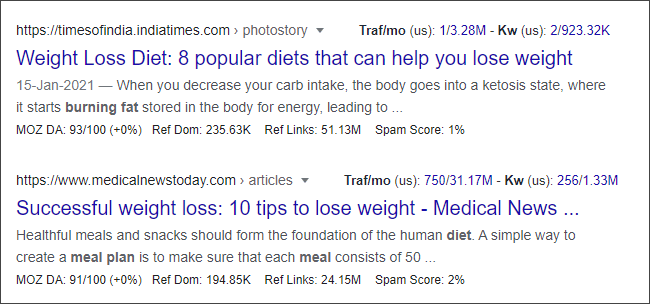
In the image above, for the search “weight loss diet”, Google considers “burning fat” and “meal plan” to be relevant too, so they are bolded.
The tool allocates 30 points proportionally based on the number of bolded words:
- Search term has 3 words, 2 words are bolded in description → 30 × 2/3 = 20 points
Stop Words Processing
Before calculation, the tool first removes the following English stop words:
a, am, an, and, any, are, as, at, be, by, can, did, do, does, for, from, had, has, have, how, i, if, in, is, it, its, may, me, might, mine, must, my, nor, not, of, oh, ok, when, who, whom, why, will, with, yes, yet, you, your
Brand Queries
Brand queries are search terms that contain brand names. These keywords typically have high SEO difficulty because Google prioritizes showing the brand’s official website and its social media accounts.
The tool marks a search term as a brand query in three situations:
- First organic result shows Sitelinks - Google only shows this expanded link format for brand official sites
- Top 3 results are from the same website - Indicates Google considers that site to be the authoritative source
- 2 or more social media results on the first page - From Twitter, Facebook, LinkedIn, Instagram, or TikTok
If you see a keyword marked as a brand query, unless you are that brand, be cautious about investing resources to compete for that term.
SEO Difficulty
SEO Difficulty is a comprehensive score calculated with the following formula:
SEO Difficulty = 35% × On-Page Difficulty + 65% × Off-Page Difficulty + Brand BonusIf it’s a brand query, an additional 20% is added to the base score.
Calculation Example
Assume a keyword has On-Page Difficulty of 90/100, Off-Page Difficulty of 69/100, and is a brand query:
- Base score = 35% × 90 + 65% × 69 = 31.5 + 44.85 = 76.35
- Brand bonus = 76.35 × 20% = 15.27
- Final SEO Difficulty = 76.35 + 15.27 = 91.62 (rounded to 92)
Score Interpretation Guide
| SEO Difficulty | Competition Level | Recommendation |
|---|---|---|
| 0-30 | Low | New sites have a chance to rank, worth trying |
| 30-50 | Medium-Low | Requires basic content optimization and link building |
| 50-70 | Medium-High | Requires strong domain authority and content quality |
| 70-85 | High | Only authoritative websites can compete |
| 85-100 | Very High | Not recommended unless you’re a top-tier website |
How to Use These Metrics for Keyword Research
Now that we understand how these metrics are calculated, let’s talk about how to use them in practice:
Perfect Opportunity: Low Difficulty + High Search Volume
When you see the following conditions, it might be a good optimization opportunity:
- SEO Difficulty < 30
- Off-Page Difficulty < 40
- On-Page Difficulty < 50
These keywords have low competition, and new sites have a chance to rank relatively quickly.
Be Cautious: High Difficulty Metrics
When the following conditions appear, you need to evaluate the ROI:
- SEO Difficulty > 70
- Off-Page Difficulty > 80 (requires lots of backlink resources)
- Brand Query = Yes (unless you are that brand)
Skip: Brand Query Keywords
For brand query keywords:
- If you’re not the brand itself, the chance of ranking first is extremely low
- Google prioritizes showing the brand’s official site and social media accounts
- High search volume but low conversion value
FAQ
Why do I see slightly different values on different devices/browsers?
These metrics are calculated in real-time based on the SERP Google provides for your search. Google adjusts search results based on:
- Your geographic location
- Whether you’re logged into a Google account
- Your search history
- Browser/device type
Therefore, searching for the same keyword on different devices may yield slightly different SERPs, leading to slightly different calculated results.
What does high On-Page Difficulty but low Off-Page Difficulty mean?
This situation usually means:
- Clear search intent, fierce content optimization competition
- Relatively low backlink competition
- Strategy: Focus on content optimization, you have a chance to rank through high-quality content
What does high Off-Page Difficulty but low On-Page Difficulty mean?
This situation usually means:
- Search intent may be broad
- Backlinks are the main competitive factor
- Strategy: Need to accumulate high-quality backlinks to compete
Summary
The 4 new SEO difficulty metrics from Keywords Everywhere are more transparent and practical than traditional “competition” metrics:
| Metric | Purpose | Data Source |
|---|---|---|
| SEO Difficulty | Overall ranking difficulty assessment | On-Page + Off-Page + Brand |
| Brand Query | Determine if it’s a brand keyword | Google SERP features |
| Off-Page Difficulty | Assess backlink competition | Moz DA + Open PageRank |
| On-Page Difficulty | Assess content optimization competition | Title/URL/Description analysis |
The biggest value of these metrics lies in transparency - all calculation formulas are public. This enables us to:
- Accurately assess keyword optimization value
- Develop targeted SEO strategies
- Avoid wasting time on keywords that are impossible to rank for
If you’re using Keywords Everywhere for keyword research, these new metrics deserve your attention.